


0
1
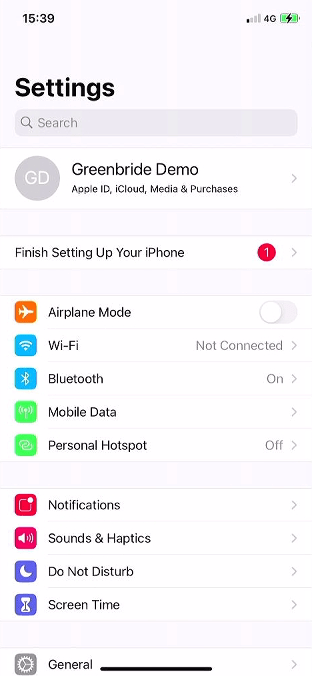
Open Settings
Tap the ‘Settings’ icon to open the settings menu.
0
2
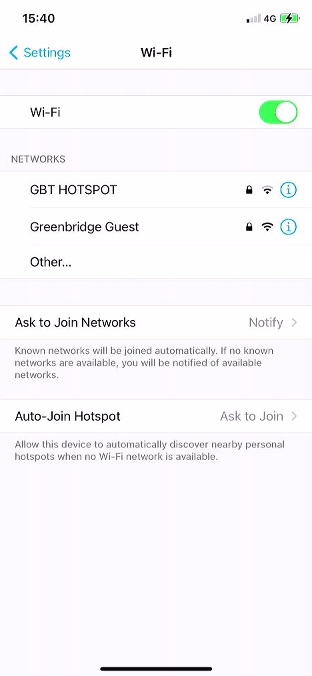
Open Wi-Fi
Tap the ‘Wi-Fi’ option to open the Wi-Fi settings.
0
3
Check Wi-Fi is On
Check the top most option is enabled, if not tap the switch to turn the Wi-Fi on.
0
4
Select Network
Tap the network name you wish to join. If you cannot see your network, check your router or speak with your internet provider.
0
5
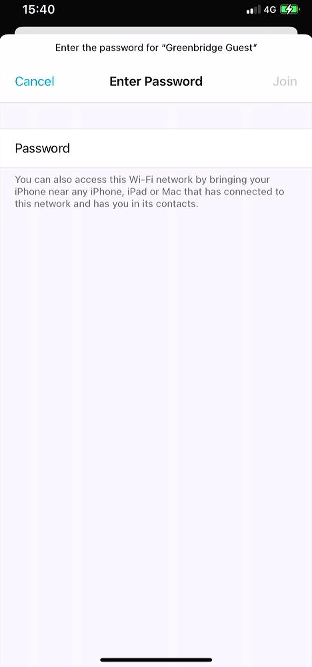
Enter Password
Enter the Wi-Fi password and tap ‘Join’.
0
6
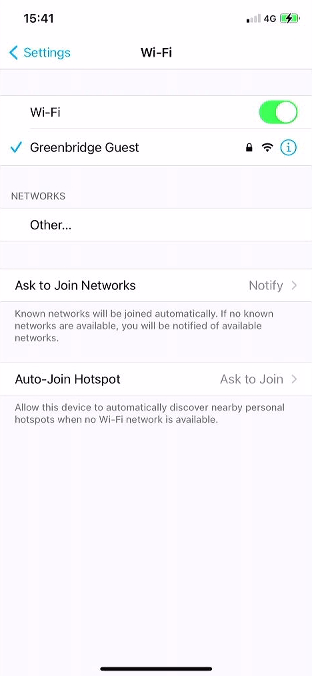
Wait unitil there’s a ‘tick’ next to the network you joined to confirm the network.